

Walk Cycle Animation: Key Poses, Frames & Step-by-Step Guide
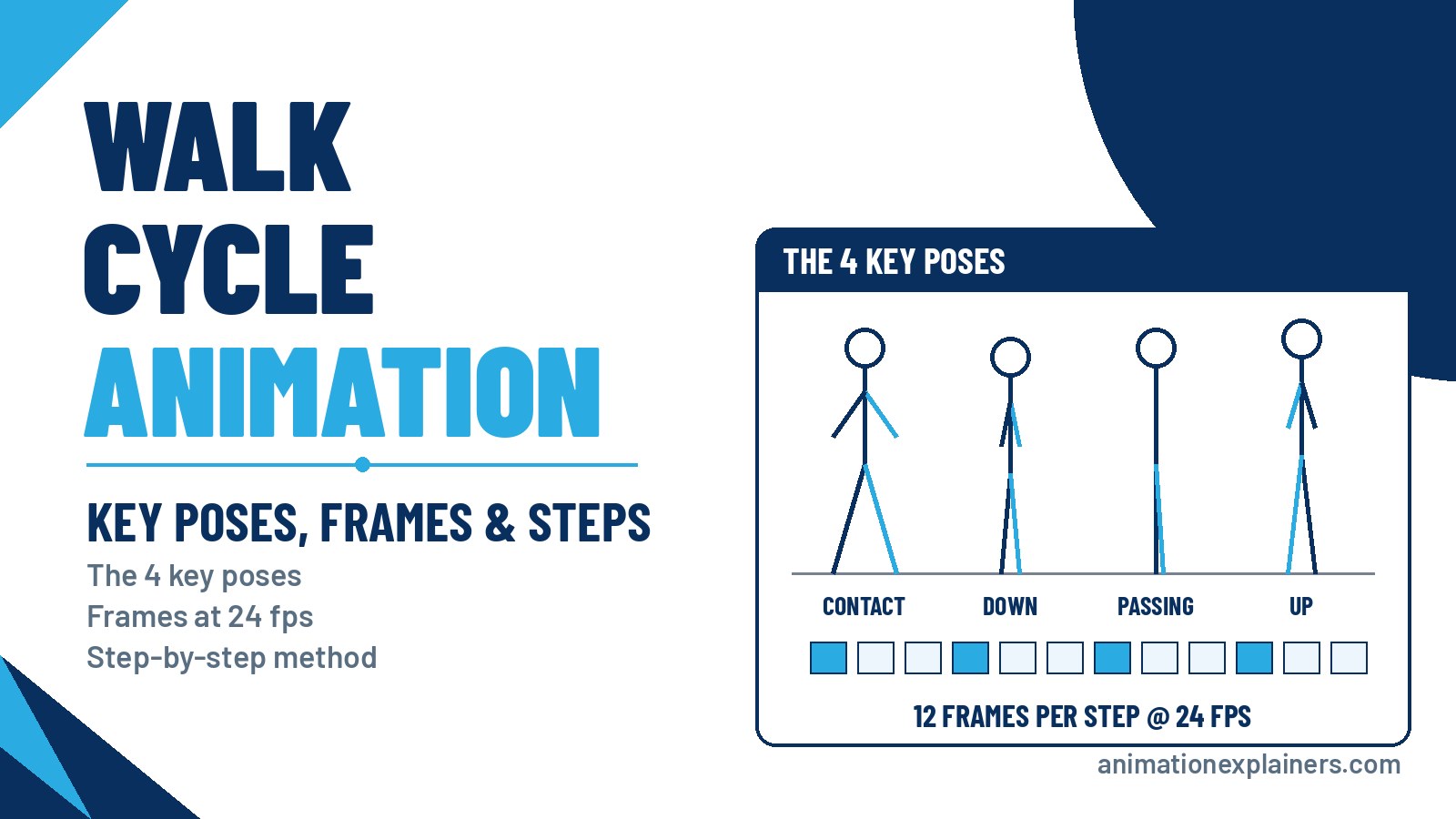
A walk cycle is a short sequence of frames that loops to show a character walking, so you don't have to animate every step again. It's built from four key poses (contact, down, passing and up) for each step, then mirrored for the other leg. At 24 frames per second, a natural walk takes about 12 frames per step, or a 24-frame cycle.
Walking looks simple, but it’s one of the hardest things to animate convincingly, because the legs, arms, hips, torso and head all move at once. This tutorial walks you through the key poses, timing, a frame chart you can copy, and the mistakes beginners make most often.
What is a walk cycle?
In animation, a walk cycle is a series of frames drawn in sequence that loop to create a walking character. Because the cycle repeats, the animator draws one full stride (two steps) and plays it over and over.
Walk cycles are a fundamental skill because almost every character walks, and the audience notices when it looks wrong. A good walk also conveys personality: the same basic mechanics can read as confident, tired, sad or excited.
Why walking animation is hard
A walk cycle uses more than half of the 12 principles of animation. Timing, slow in and slow out, and arcs control the rhythm. Follow-through and overlapping action move the arms, hair and clothing. Pose-to-pose organises the key positions.
The difficulty is that everything happens at once. If the weight shift, arm swing and head bob don’t line up, the character looks like it’s floating or limping, even if each body part is right on its own.
The four key poses of a walk cycle
Each step in a walk is built from four poses. Draw these first, then add the in-betweens.
- Contact. Both feet are on the ground, at their widest stride. The front heel has just touched down and the back toe is about to push off. This pose sets the length of the step.
- Down. The front leg bends to take the weight and the body drops to its lowest point. This is where the walk feels heavy.
- Passing. The back leg swings forward past the standing leg. The body rises again, roughly halfway through the step.
- Up. The standing leg pushes off and the body reaches its highest point, just before the swinging foot reaches forward into the next contact.
The second step repeats the same four poses with the legs and arms swapped. The contact pose at the end of the second step is the same as the first, which is what lets the cycle loop.
Frames drawn between these key poses are called in-betweens. They can be drawn by hand or interpolated by software.
How many frames is a walk cycle?
It depends on the speed and the character. At 24 frames per second, the timing guide adapted from Richard Williams’s The Animator's Survival Kit gives these lengths for a full cycle (two steps):
| Cycle length (24 fps) | Frames per step | Feels like |
| 16 frames | 8 | A fast, bouncy “cartoon” walk or slow run |
| 24 frames | 12 | A brisk, natural walk (two steps a second) |
| 32 frames | 16 | A relaxed stroll |
| 40 frames | 20 | An elderly or tired person |
| 48 frames | 24 | A slow, deliberate step (one step a second) |
A 24-frame cycle is the usual starting point for beginners: one second, one full stride.
Frames, ones and twos
At 24 fps, animating "on ones" means a new drawing on every frame, so 24 drawings per second. Animating "on twos" holds each drawing for two frames, so 12 drawings per second.
The speed of the walk stays the same either way; only the smoothness changes. Many 2D animators work on twos for normal walks because it halves the drawing count and still looks smooth.
A 24-frame walk cycle frame chart
Here’s a simple layout for a 24-frame cycle on twos, following the common practice of placing the contacts on frames 1, 13 and 25:
| Frame | Pose | Notes |
| 1 | Contact (right leg forward) | Widest stride; left arm forward |
| 4 | Down | Body at its lowest; front knee bends |
| 7 | Passing | Left leg swings past; body rising |
| 10 | Up | Body at its highest; push-off |
| 13 | Contact (left leg forward) | Mirror of frame 1 |
| 16 | Down | Mirror of frame 4 |
| 19 | Passing | Mirror of frame 7 |
| 22 | Up | Mirror of frame 10 |
| 25 | Contact (= frame 1) | Same as frame 1; leave it out of the loop |
Frame 25 is identical to frame 1, so play back frames 1 to 24. Including frame 25 gives the loop a small hiccup.
How to animate a walk cycle, step by step
- Film or find reference. Watch a real walk at the speed you want and time it. If one stride takes a second, you need 24 frames.
- Set up the walk in place. Most cycles are animated on the spot, like a treadmill. The background or the character’s position moves separately.
- Draw the two contact poses. Get the stride length and balance right before anything else.
- Add the passing poses. Place them halfway between the contacts, with the body slightly higher.
- Add the down and up poses. These create the weight and the bounce.
- Check the arms. Arms swing opposite to the legs: when the right leg is forward, the right arm is back. They should swing on arcs from the shoulder, not in straight lines.
- Add the in-betweens. Fill the gaps by hand or with software interpolation.
- Layer in overlap. Add follow-through on hair, clothing and the hands. Then add the counter-rotation: the hips and shoulders twist in opposite directions, and the hip on the side of the swinging leg dips slightly.
- Loop it and watch it many times. Problems like a skating foot or a pop in the loop show up after a few repeats.
Walking in place vs walking across the screen
There are two ways to set up a walk, and the right one depends on how you’ll use it.
- In place (a cycle). The character stays on the spot, like it’s on a treadmill, while the planted foot slides back at an even speed. This is what you want for a walk you’ll loop and reuse. The scene, the camera or the character’s position then carries it forward.
- Across the screen (straight ahead). The character actually travels, and each planted foot stays fixed on the ground until it lifts. Use this for a one-off walk, such as a few steps to a chair, or when the steps have to land on specific marks.
If you move an in-place cycle across a scene, match the travel speed to the feet. If the planted foot appears to slide backwards, the character is moving too slowly; if it slides forwards, it’s moving too fast. Adjust the distance or the timing until the foot looks locked to the ground.
Common walk cycle mistakes
- Sliding feet. In an in-place cycle, the planted foot must move back at a steady rate. Otherwise the character looks like it’s skating.
- Arms and legs in sync. Arms and legs on the same side should move in opposite phases. Getting this wrong produces a physically impossible walk.
- No up and down. Without the down and up poses, the body glides at one height and looks like it’s floating. Keep the bob small, though: too much reads as bouncy or cartoony.
- Arms that swing in straight lines. Arms pivot from the shoulder, so the hands should travel on arcs.
- A stiff torso. The hips and shoulders twist in opposite directions as the character walks.
- A hiccup in the loop. Usually caused by repeating the first frame at the end of the cycle.
Giving a walk personality
Once the mechanics work, change them to tell the audience who the character is. A longer stride and a higher “up” reads as confident. A lowered head, short steps and slow timing read as tired or sad. A bouncier, faster cycle feels playful.
Disney animator James Baxter gave Belle in Beauty and the Beast (1991) a graceful, ballet-inspired walk that still felt believable. It’s a good example of the same four poses carrying a whole personality.
Walk cycles in 2D, 3D and stop motion
The four poses are the same whatever the medium. Walk cycles are traditionally hand-drawn, but they’re also made in pixel art, 2D digital animation, 3D computer animation, stop motion such as claymation and cut-out animation, and by rotoscoping live footage.
In 3D, software interpolates between your keys, so the job shifts from drawing in-betweens to refining curves and timing. For more practical advice, see our animation tips and our overview of the different types of animation.
Character animation is a big part of what we do in explainer videos, where a character’s walk or gesture often carries the story. If you’d like a character-led explainer for your business, see how our explainer video production works.
Here’s an example of character animation in one of our recent explainers, made for Vertech:
FAQ
What is a walk cycle in animation?
A walk cycle is a series of frames that loop to show a character walking. The animator draws one full stride (two steps) and repeats it, so every step doesn’t have to be animated again.
What are the four poses of a walk cycle?
Contact, down, passing and up. Contact is the widest stride, down is the lowest point as the front leg takes the weight, passing is when the back leg swings past, and up is the highest point before the next contact.
How many frames is a walk cycle?
At 24 frames per second, a natural walk is usually a 24-frame cycle, or 12 frames per step. Faster walks use around 16 frames and slower walks 32 to 48 frames.
How many drawings do I need for a walk cycle?
It depends on whether you animate on ones or twos. A 24-frame cycle on twos needs 12 drawings; on ones it needs 24. The speed of the walk is the same either way.
How do I make a walk cycle look natural?
Start from reference, nail the contact and passing poses, add the down and up poses for weight, swing the arms opposite to the legs and add a little hip and shoulder rotation. Then loop it and fix anything that pops or slides.
Why do my character’s feet slide?
In an in-place walk, the planted foot must move backwards at a constant rate across the frames it’s on the ground. If the spacing is uneven, the foot appears to skate.
Should I animate a walk in place or moving forward?
Animate it in place if you’ll loop and reuse it; the scene or the character’s position moves it forward. Animate it moving across the screen for a one-off walk where each foot needs to land on a particular spot.
Why does my walk look like it’s floating?
Usually because the body stays at one height or the feet slide. Make the down pose lower and the up pose higher, and match the speed the character travels to the speed of its planted foot.
What’s the difference between a walk cycle and a run cycle?
In a walk, at least one foot is always on the ground. In a run, there are moments when both feet are off the ground, and the cycle is usually shorter.
Can Animation Explainers animate characters for my business video?
Yes. Character animation is a core part of our explainer videos. Tell us about your audience and message, and we’ll suggest a style and approach that fits.

What is a walk cycle in animation?
A walk cycle is a series of frames that loop to show a character walking. The animator draws one full stride (two steps) and repeats it, so every step doesn’t have to be animated again.
What are the four poses of a walk cycle?
Contact, down, passing and up. Contact is the widest stride, down is the lowest point as the front leg takes the weight, passing is when the back leg swings past, and up is the highest point before the next contact.
How many frames is a walk cycle?
At 24 frames per second, a natural walk is usually a 24-frame cycle, or 12 frames per step. Faster walks use around 16 frames and slower walks 32 to 48 frames.
How many drawings do I need for a walk cycle?
It depends on whether you animate on ones or twos. A 24-frame cycle on twos needs 12 drawings; on ones it needs 24. The speed of the walk is the same either way.
How do I make a walk cycle look natural?
Start from reference, nail the contact and passing poses, add the down and up poses for weight, swing the arms opposite to the legs and add a little hip and shoulder rotation. Then loop it and fix anything that pops or slides.
Why do my character’s feet slide?
In an in-place walk, the planted foot must move backwards at a constant rate across the frames it’s on the ground. If the spacing is uneven, the foot appears to skate.
Should I animate a walk in place or moving forward?
Animate it in place if you’ll loop and reuse it; the scene or the character’s position moves it forward. Animate it moving across the screen for a one-off walk where each foot needs to land on a particular spot.
Why does my walk look like it’s floating?
Usually because the body stays at one height or the feet slide. Make the down pose lower and the up pose higher, and match the speed the character travels to the speed of its planted foot.
What’s the difference between a walk cycle and a run cycle?
In a walk, at least one foot is always on the ground. In a run, there are moments when both feet are off the ground, and the cycle is usually shorter.
Can Animation Explainers animate characters for my business video?
Yes. Character animation is a core part of our explainer videos. Tell us about your audience and message, and we’ll suggest a style and approach that fits.