

How to Write a Script for an Explainer Video That Converts
Even the most breathtaking, high-budget animation will fail to drive results if it’s built on a weak script. In the world of video marketing, your script is the foundation. It controls the pacing, sets the tone, and—most importantly—is responsible for guiding your viewer from a state of curiosity to taking a concrete action.
The golden rule of high-converting explainer videos is to keep things punchy. Ideally, your video should run between 60 and 90 seconds. Because the average voiceover speed is about 130 to 150 words per minute, you only have about 150 to 220 words to make your impact.
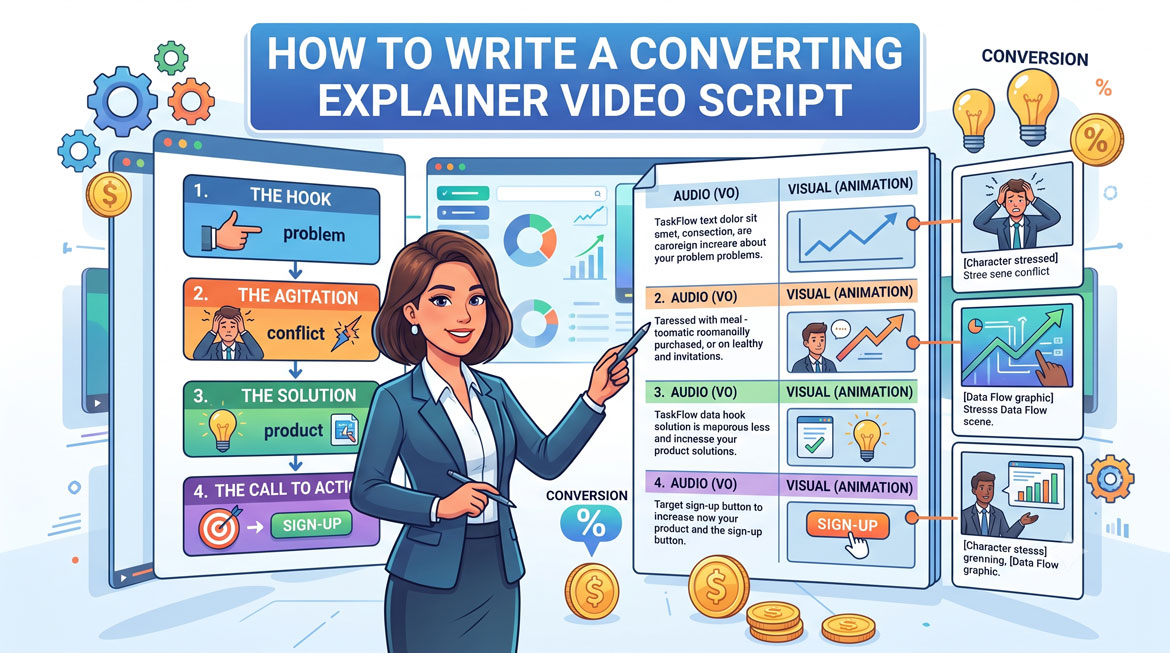
To maximize every single word, top copywriters use a proven, time-tested framework. Here is the step-by-step formula to write an explainer video script that converts.
The 4-Step Scriptwriting Framework
Step 1: The Hook (0–15 Seconds)
Don’t open with a boring corporate history or an introduction of your executive team. Start immediately with your customer. Call out your target audience and state their primary problem or frustration right away.
- Example: “Managing a remote marketing team can feel like herding cats. Tasks slip through the cracks, deadlines get missed, and communication breaks down.”
Step 2: The Agitation (15–30 Seconds)
Now that you have their attention, validate their pain. Explain why this problem is a massive headache and highlight the negative consequences of leaving it unresolved. This builds emotional connection and urgency.
- Example: “And the more tools you throw at the problem, the worse it gets. You end up wasting hours syncing apps instead of actually scaling your business.”
Step 3: The Solution (30–60 Seconds)
Introduce your product or service as the ultimate hero of the story. This is where you reveal your software or brand and visually demonstrate how it solves the exact problems you just agitated. Focus heavily on benefits, not just raw features.
- Example: “Meet TaskFlow—the all-in-one workspace designed specifically for remote marketing teams. TaskFlow centralizes your communication, automates project tracking, and cuts your weekly meeting time in half.”
Step 4: The Call to Action (60–90 Seconds)
Never assume the viewer knows what to do next. End your video with a single, crystal-clear action step. Keep it simple: tell them exactly where to go and what to click.
- Example: “Stop letting tasks slip through the cracks. Start your free 14-day trial at TaskFlow.com today.”
Pro-Tips for Scriptwriting Success
- Write for the Ear, Not the Page: Written copy can be complex, but spoken copy must be simple. Use short sentences. Use contractions (use “it’s” instead of “it is”). Read your script out loud to ensure it flows naturally without causing the speaker to run out of breath.
- Use a Two-Column Format: When drafting your script, split your document into two columns: Audio (the voiceover script) on the left, and Visual Cues (what the animator should show on screen) on the right. This ensures your words match your visuals perfectly.
- Show, Don’t Just Tell: If your voiceover says “Our platform secures your data,” the visual column shouldn’t just show text. It should describe a visual metaphor—like a digital vault locking down or a shield blocking a malicious cyber threat.
The Writer’s Trap
The biggest mistake businesses make is trying to fit everything into a single video. An explainer video is a teaser designed to spark immediate interest, not an exhaustive user manual. Leave them wanting to learn more!
Prefer to leave the storytelling to the experts?
Writing a tight, high-converting script within a strict word limit is tough. At Animation Explainers, our professional scriptwriters handle everything from concept ideation to storyboard synchronization. Book a free script consultation with our team today and let’s craft a story that sells.